Members of the community have generally regarded this controller with positive sentiment. Learn more.
¶ General Information
| Question | Answer |
|---|---|
| Common Name | 8BitDo Ultimate 2 |
| Model | 80ND (manual) |
| Manufacturer | SHENZHEN ONEBITDO TECH CO.,LTD. |
| Leaderboard Legal Turbo? |  Yes |
| Connection Modes | Bluetooth Wireless, Wired USB |
| Compatible Systems | Nintendo Switch, Nintendo Switch 2 |
| Battery Bank Capacity | 1,000 mAh |
| Sentiment Power |  |
¶ Overall Sentiment
Members of the community have generally regarded this controller with positive sentiment:
[This controller is] great for starting out but after a while you'll want to look for better alternatives.
¶ Programmability At a Glance
| Question | Answer |
|---|---|
| Turbo? | Yes |
| Companion software? |  8BitDo Ultimate Software V2 |
| Custom Button Mapping? | Yes |
| Adjustable Stick Deadzone? | Yes |
| Adjustable Analog Curve? |  No |
| Macro Functionality? | Yes |
| Can be remapped in Nintendo Switch software? | Yes |
¶ Turbo At a Glance
This controller has two turbo modes: a traditional turbo mode, and a "lightswitch" turbo mode, where pressing the button once activates the autofire for that button without needing to hold the button down. Pressing the same button again turns off the autofire. When you need to deactivate turbo for a specific button, you will have to hold
and press the desired button twice.
| Question | Answer |
|---|---|
| Turbo Button Remappable? | Yes |
| Buttons that can use turbo function | All buttons except LS and RS |
| Adjustable Turbo? | No |
| "Sanity Check" Indicator? | Yes |
| How to activate turbo function? | Hold the button you want to use with turbo and press . |
| Is there a global turbo reset function? | Press "Profile" button until you return to the same profile you were using |
| Advertised Fire Rate (Hz) | Not provided |
| Turbo Time to Live (TTL) | Short |
| All Turboed Buttons on Same Duty Cycle? | Yes |
¶ Detailed Turbo Information
| Mode | Actual Hz | Distance under leaderboard cap |
|---|---|---|
 Bluetooth (FW 2.00) |
16.3 | -4.7 |
| Wired USB (FW 2.01, Switch 1) | 20.2 ⏩ | -0.8 |
| Wired USB (FW 2.01, Switch 2) | 18.6 | -2.4 |
⏩ requires USB-C cable rated for 5Gbps of transfer or more
¶ Turbo Gold Skip
| Mode | 0 Lock? | 1 Lock? | 2 Lock? |
|---|---|---|---|
| Bluetooth (FW 2.00) |
Yes |
Yes |
Yes |
| Wired USB (FW 2.01, Switch 1) | Yes |
Yes |
Yes |
| Wired USB (FW 2.01, Switch 2) | Yes |
Yes |
Yes |
¶ Sticks At a Glance
This controller's analog sticks do not degrade in quality over time. Learn more.
| Question | Answer |
|---|---|
| Analog Layout Style | Switch |
| Analog Sensor | TMR sensor |
| Stick Circularity Average Error (SCAE) | 7.9% |
| Advertised SCAE | Not provided |
¶ Stick Assessment
- Hardware: solid feel, rotates smoothly
¶ Buttons At a Glance
This controller provides trigger stop switches that allow the user to change between analog and digital triggers. For Metroid Dread, make sure your trigger stops are in the "UP" position.
| Question | Answer |
|---|---|
| Trigger Type |  Universal |
| Back Paddles? | Yes |
| Back Paddle Turboable? | Yes† |
| Back Paddle Assignable Buttons | All except LS and RS |
| Back Paddle Rollover? | Unknown |
| "Fire" Button Shape | Convex |
| Horizontal distance between face buttons (measured in cm from button center) | Unknown |
| Button Firmness | Medium |
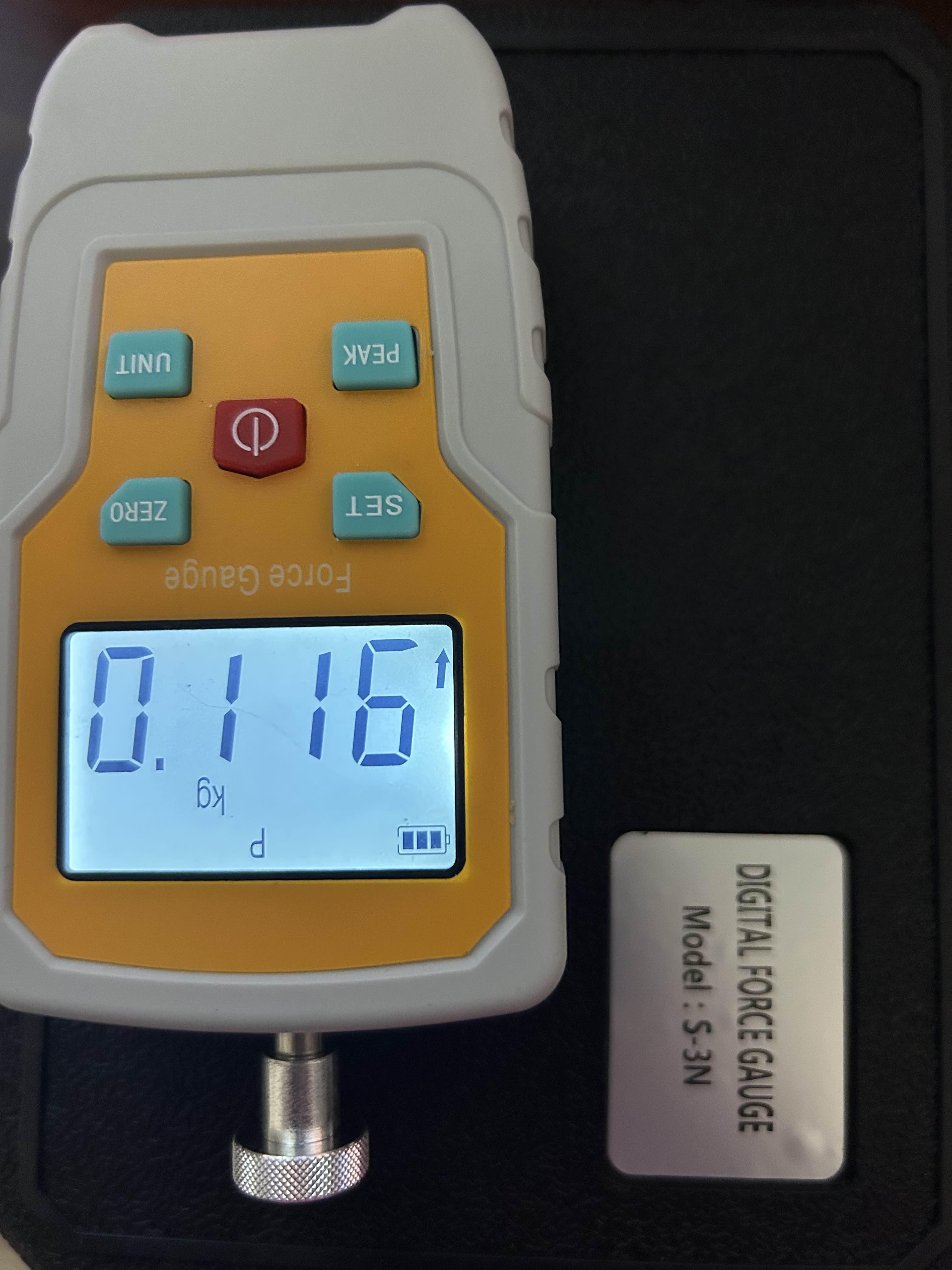
| Actuation force (g) | 116 |
| Programmable Face Buttons? | No |
| Programmable Shoulder Buttons? | Yes (L4 and R4) |
| Programmable Shoulder Button Turboable? | Yes |
| Programmable Shoulder Button Allowed Assignments | All except LS and RS |
| Programmable Shoulder Button Rollover? | Not tested |
†Auto-turbo not available on these buttons
¶ Button Assessment
Coming soon
¶ Positive Sentiment
Love the programmable shoulder buttons and the universal trigger stops.
Controller is relatively small, about the same size as a Pro Controller 2 and are easy on the hands, which makes it a viable alternative for high level gameplay, providing a reliable speedrunning experience.
The sticks are vastly superior to the Pro Con 2.
Turbo functionality that provides a decent firerate, can bind it to back buttons to use specific buttons while the real buttons can remain unturboed.
¶ Negative Sentiment
Turbo speed varies greatly depending on Bluetooth interference, whether your console is Switch 1 or Switch 2, and, when using a wired connection, the data speed rating of your cable and USB polling rate of the receptacle.
While the TMR sticks provide a much better experience than Nintendo sticks, it is still quite prone to snapback at high level movement, though these are rare and not nearly as [egregious] as a Pro Con 2
The
+and–buttons are small and easy to miss, making tricks like NJC have a high fail rate, compared to a Pro Con 2 which are decently sized and extend upwards for easy access
The face buttons are hard to press, which can be very uncomfortable at times, especially for high level gameplay, and sometimes can leave some mild pain in your fingertips.
While it has a decent Turbo, it still leaves a lot to be desired, not to mention it still suffers from BT packet loss making it not 100% consistent, you can increase it with a specific firmware version and a high speed cable but it will add a very minor input delay which is unreliable for speedruns and the firerate becomes even more inconsistent with noticeable gaps between shots.
¶ Autofire Data
Coming soon.
¶ Circle Test Video
Coming soon.
¶ Actuation Force Test
This device's "fire" button actuation force was verified with a 3N-range digital force gauge.
¶ Firmware Files
While these firmware files are sourced from the manufacturer, the maintainers of the Controller Research Guide do not take any responsibility for bricks or other malfunctions. If you have an issue, write an email to support@8bitdo.com or make a post on the 8BitDo Subreddit. Flash at your own risk!
Firmware files are sorted in reverse chronological order.
- 2.01 (published September 1, 2026) (will add later -j)
¶ Breakages and Defects by Component
Breakages reported through anecdotal consumer use:
| Part | # Units | # Players |
|---|---|---|
| Left Stick | 0 | 0 |
| Right Stick | 0 | 0 |
| A/B/X/Y | 0 | 0 |
| L/R | 0 | 0 |
| ZL/ZR | 0 | 0 |
| L3/R3 | 0 | 0 |
| L4/R4 | 0 | 0 |
| +/- | 0 | 0 |
| P1/P2 | 0 | 0 |
| Button |
0 | 0 |
| Profile Button | 0 | 0 |
| Pairing Button | 0 | 0 |
| Gyro | 0 | 0 |
| LEDs | 0 | 0 |
¶ Accounts
¶ Breakage Account
No breakage accounts yet.