This is a Controller Research Guide recommended controller. Learn more.
Members of the community have generally regarded this controller with very positive sentiment. Learn more.
The frequency of this controller's turbo function can be customized.
¶ General Information
| Question | Answer |
|---|---|
| Common Name | FlyDigi Vader 5 Pro |
| Model | Vader 5 Pro (manual) |
| Manufacturer | SHANGHAI FLYDIGI ELECTRONICS TECHNOLOGY CO., LTD. |
| Leaderboard Legal Turbo? |  Yes Yes |
| Connection Modes | Bluetooth Wireless, Wired USB |
| Compatible Systems | Nintendo Switch, Nintendo Switch 2 |
| Battery Bank Capacity | 1000 mAh |
| Sentiment Power |  |
¶ Recommendation
2026: Ergonomic, bursting with features, and very durable. Improves on the Vader 4 Pro (already a great controller) in almost every conceivable way.
¶ Programmability At a Glance
| Question | Answer |
|---|---|
| Turbo? | Yes |
| Companion software? |  FlyDigi Space Station 4.0+ FlyDigi Space Station 4.0+ |
| Custom Button Mapping? | Yes |
| Adjustable Stick Deadzone? | Yes |
| Adjustable Analog Curve? | Yes |
| Macro Functionality? | Yes |
| Can be remapped in Nintendo Switch software? | Yes |
¶ Turbo At a Glance
| Question | Answer |
|---|---|
| Turbo Button Remappable? | No |
| Buttons that can use turbo function | All buttons except HOME, CAPTURE, and TURBO |
| Adjustable Turbo? | Yes, through FlyDigi Space Station app |
| "Sanity Check" Indicator? |  No No |
| How to adjust turbo speed? | Use companion app |
| How to activate turbo function? | Use companion app or TURBO button |
| Is there a global turbo reset function? | No |
| Advertised Fire Rate (Hz) | Not provided |
| Turbo Time to Live (TTL) | Fast |
| All Turboed Buttons on Same Duty Cycle? | No |
¶ Detailed Turbo Information
It is highly recommended to customize your turbo using the companion app. The
TURBObutton activates turbo, but the speed is not adjustable.
| Mode | Actual Hz | Distance under leaderboard cap |
|---|---|---|
| Bluetooth | 14.2 | -6.8 |
| Wired USB | 15.0 | -6.0 |
¶ Turbo Gold Skip (using granular turbo)
Below are the recommended consistent custom turbo settings in FlyDigi Space Station to achieve various speeds of Gold Skip. Set your turbo fire frequency to these values for best results. Values other than these may work, but the consistency will depend on your environment, your console, and the amount of interference present.
| Mode | 0 Lock? | 1 Lock? | 2 Lock? |
|---|---|---|---|
| Bluetooth | 20 | 16 | 13 or 14 |
| Wired USB | 20 | 16 | 13 or 14 |
--
¶ Turbo Gold Skip (using TURBO button)
| Mode | 0 Lock? | 1 Lock? | 2 Lock? |
|---|---|---|---|
| Bluetooth | No |
Yes |
Yes |
| Wired USB | No |
Yes |
Yes |
¶ Granular Turbo Values
The below values were verified on a hacked Switch system with an autofire tester. Learn more.
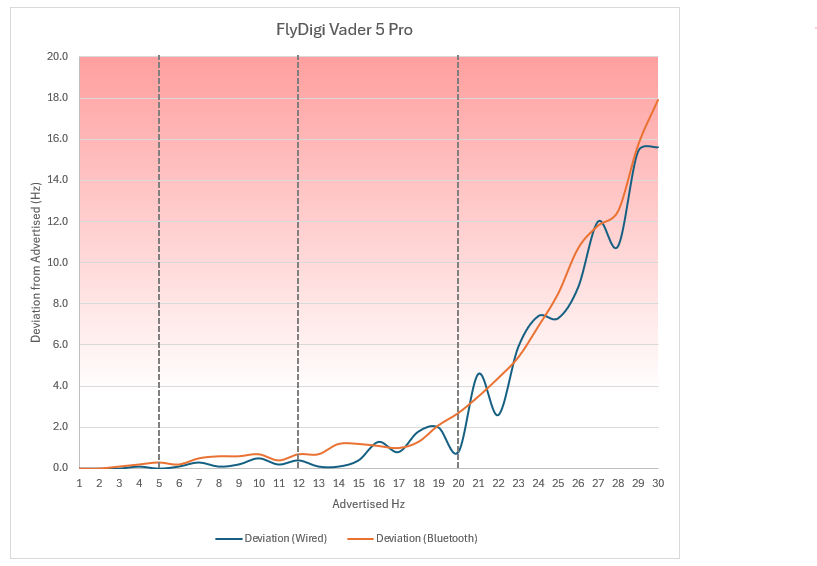
Settings above 20 are highly unstable and cannot be relied upon.
| Hz | 1 | 2 | 3 | 4 |
|---|---|---|---|---|
| Bluetooth | 1.0 | 2.0 | 2.9 | 3.8 |
| Wired USB | 1.0 | 2.0 | 3.0 | 3.9 |
| Hz | 5 | 6 | 7 | 8 |
|---|---|---|---|---|
| Bluetooth | 4.7 | 5.8 | 6.5 | 7.4 |
| Wired USB | 5.0 | 5.9 | 6.7 | 7.9 |
| Hz | 9 | 10 | 11 | 12 |
|---|---|---|---|---|
| Bluetooth | 8.4 | 9.3 | 10.6 | 11.3 |
| Wired USB | 8.8 | 9.5 | 10.8 | 11.6 |
| Hz | 13 | 14 | 15 | 16 |
|---|---|---|---|---|
| Bluetooth | 12.3 | 12.8 | 13.8 | 14.9 |
| Wired USB | 12.9 | 13.9 | 14.6 | 14.7 |
| Hz | 17 | 18 | 19 |
|---|---|---|---|
| Bluetooth | 16.0 | 16.7 |  16.9 16.9 |
| Wired USB | 16.2 | 16.2 | 17.0 |
| Hz | 20 | 21 | 22 |
|---|---|---|---|
| Bluetooth | 17.3 |
17.5 |
17.6 |
| Wired USB | 19.2 | 16.4 |
19.4 |
| Hz | 23 | 24 | 25 |
|---|---|---|---|
| Bluetooth | 17.1 |
16.5 |
15.3 |
| Wired USB | 17.1 |
16.6 |
17.7 |
| Hz | 26 | 27 | 28 |
|---|---|---|---|
| Bluetooth | 15.2 |
15.5 |
15.5 |
| Wired USB | 17.2 |
15.0 |
17.2 |
| Hz | 29 | 30 |
|---|---|---|
| Bluetooth | 13.3 |
12.1 |
| Wired USB | 13.6 |
14.4 |
- measured value deviates significantly (2Hz or greater) from advertised value
¶ Sticks At a Glance
This controller's analog sticks do not degrade in quality over time. Learn more.
This controller's analog sticks can be set to either "rectangular" or "circular" mode. For Metroid Dread, make sure to set the sticks to "circular" mode to ensure that free aim is as accurate as possible.
| Question | Answer |
|---|---|
| Analog Layout Style | Switch |
| Analog Sensor | "ForceFlex†" Hall effect sensor |
| Stick Circularity Average Error (SCAE) |  0.1% (circular mode only) 0.1% (circular mode only) |
| Advertised SCAE | Not provided |
| Adjustable Stick Tension? | Yes |
- †Though these analog sticks are Hall effect, FlyDigi has implemented a proprietary technology known as "ForceFlex" to compensate for the non-linear response curves Hall effect analog sticks are known for.
¶ Stick Assessment
- Hardware: the tension of both sticks is adjustable using a tensioner ring on the outer edge
The analog stick sensors are extremely precise and responsive, with a customizable response curve for each stick (via the companion app). The sensors are precise enough that the sticks have no deadzone by default, but this can be customized using the companion app.
With factory settings, the sticks do suffer from moderate snapback, but there is a per-profile setting called "Joystick Debounce" which eliminates snapback without any negative side-effects.
¶ Buttons At a Glance
This controller provides trigger stop switches that allow the user to change between analog and digital triggers. For Metroid Dread, make sure your trigger stops are in the "UP" position.
This controller has an atypical face button layout for a Switch controller. This is purely cosmetic.
| Question | Answer |
|---|---|
| Trigger Type | Universal |
| Back Paddles? | Yes, 4 (two buttons, two flippers) |
| Back Paddle Turboable? | Yes |
| Back Paddle Assignable Buttons | All except HOME, CAPTURE, and TURBO |
| Back Paddle Rollover? | Full (4) |
| "Fire" Button Shape | Convex |
| Horizontal distance between face buttons (measured in cm from button center) | 2.2 |
| Vertical distance between face buttons (measured in cm from button center) | 2.3 |
| Button Firmness | Medium |
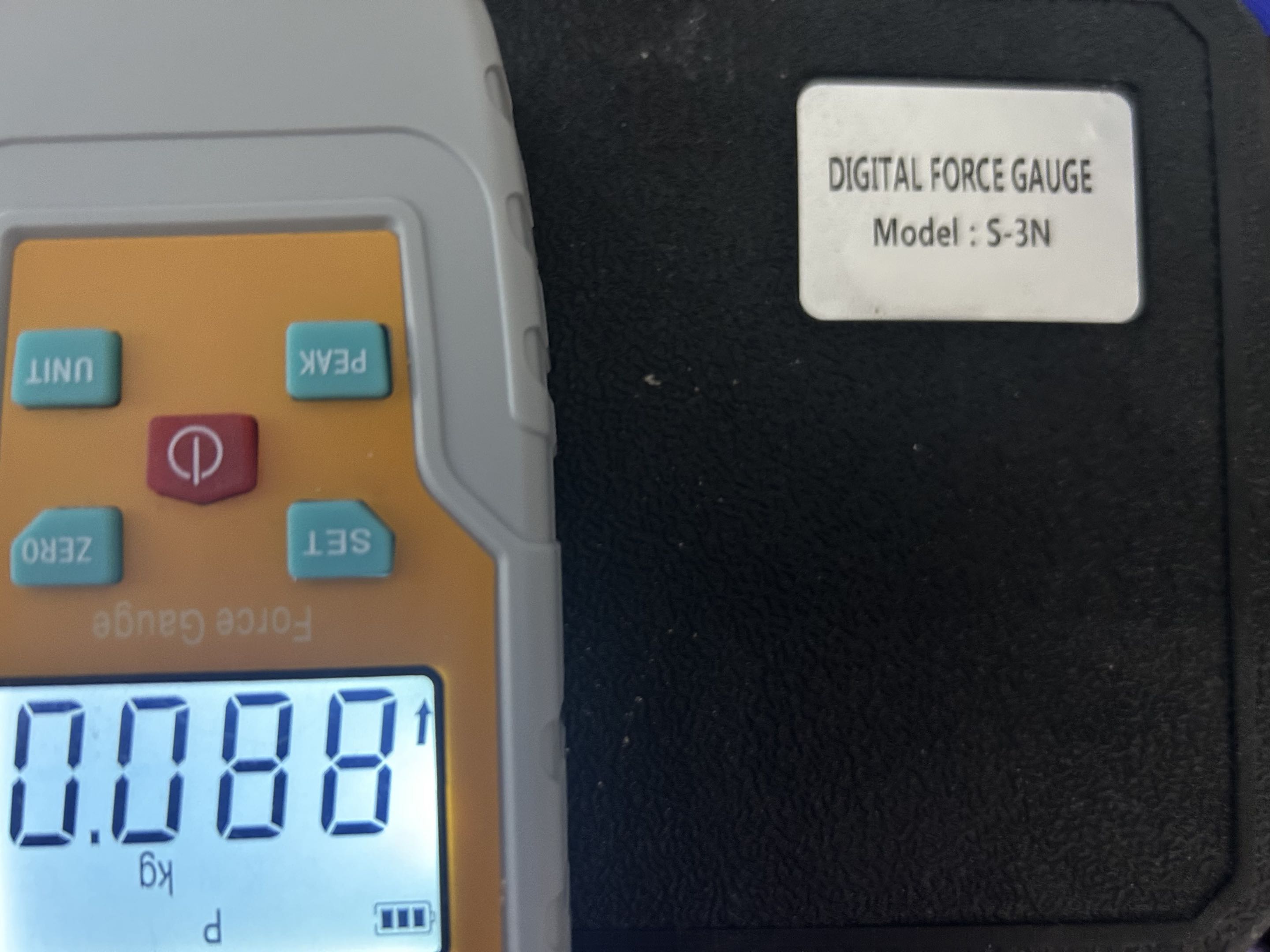
| Actuation force (gf) | 88 |
| Programmable Face Buttons? | Yes, 2 |
| Programmable Face Button Turboable? | Yes |
| Programmable Face Button Allowed Assignments | All except HOME, CAPTURE, and TURBO |
| Programmable Face Button Rollover? | Full (2) |
| Programmable Shoulder Buttons? | Yes, 2 |
| Programmable Shoulder Button Turboable? | Yes |
| Programmable Shoulder Button Allowed Assignments | All except HOME, CAPTURE, and TURBO |
| Programmable Shoulder Button Rollover? | Full (2) |
¶ Button Assessment
- Hardware: these buttons have mechanical switches:
A,B,X,Y
Hardware: D-Pad is very good, face buttons are easy to press but difficult to press accidentally. The flipper back paddles often get in the way but are removable.
Firmware: No reported issues
¶ Positive Sentiment
The best controller I've used to date.
Translates great from the [FlyDigi Vader] Pro 4 without the larger paddles attached.
Unlike the Vader 4, the sticks on the Vader 5 can be configured to be completely circular in Nintendo Switch mode.
The effort needed to click the analog sticks on the Vader 5 is no longer tied to the stick tensioner, which is an improvement from the Vader 4.
Profile quick-switching is a lot harder to do accidentally than with the Vader 4.
No shortage of programmable buttons!
¶ Negative Sentiment
Pretty difficult to open up even for just cleaning.
High interference can cause the Vader 5 to drop Bluetooth packets, resulting in reduced turbo speed in BT mode on average.
Seems more susceptible to Bluetooth interference than its predecessor.
¶ Autofire Data
This device's turbo speed was verified on a hacked Switch system with an autofire tester. Learn more.
The below archive contains measurement data for all turbo speeds on this controller.
¶ Circle Test Video
Coming soon
¶ Granular Turbo Deviation Graph
Values above 20Hz are extremely inaccurate.
¶ Actuation Force Test
This device's "fire" button actuation force was verified with a 3N-range digital force gauge.
¶ Breakages and Defects by Component
Breakages reported through anecdotal consumer use:
| Part | # Units | # Players |
|---|---|---|
| Left Stick | 0 | 0 |
| Right Stick | 0 | 0 |
| A/B/X/Y | 0 | 0 |
| L/R | 0 | 0 |
| ZL/ZR | 0 | 0 |
| L3/R3 | 0 | 0 |
| +/- | 0 | 0 |
| M1/M2/M3/M4 | 0 | 0 |
| C/Z | 0 | 0 |
| Home Button | 0 | 0 |
| Share Button | 0 | 0 |
| Gyro | 0 | 0 |
| LEDs | 0 | 0 |
¶ Accounts
¶ Defect Account
| Question | Answer |
|---|
| Scenario | Intervention |
|---|
¶ Breakage Account
No breakage accounts yet.